COMING SOON: Website under construction. Check back in Later
The Wrong Manual: Why You Can’t Run "iOS" on "Android" Hardware
Challenging the framework often used when attempting to support a neurodivergent loved one.
FAMILY & FRIENDSADHDAUTISM
Tahirat Nasiru, LCSW
3/3/20264 min read
Greetings 👋🏽!
We’ve all been there: a device is glitching, the screen is frozen, or it’s just not performing the way it’s supposed to. Your first instinct is to grab the manual or take it to a repair shop.
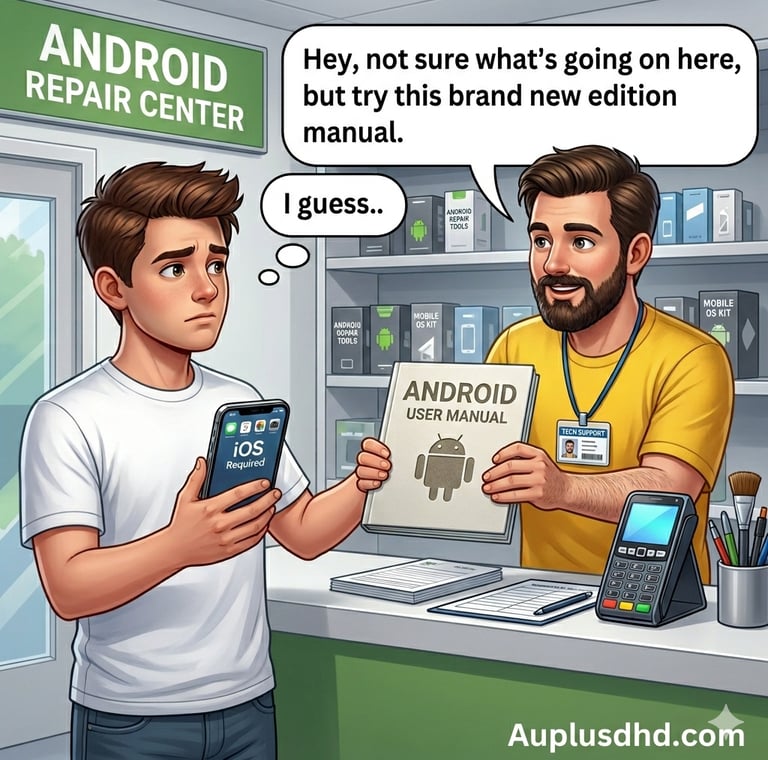
But imagine taking a malfunctioning iPhone to an Android Repair Center. The technician looks at the Apple logo, shrugs, and hands you a brand-new manual—for a Samsung.
"Just follow these steps," they say. "It works for all our other phones."
It sounds ridiculous, right? No matter how hard you try to swipe, click, or troubleshoot using that Android manual, the iPhone isn't going to change its core programming. It isn't "broken"; it’s just running a completely different Operating System (OS).
Understanding the "Brain OS"
In the world of neurodiversity, we often see this exact scenario play out. Most of the world is built for the Neurotypical (NT) operating system—the "standard" software that most people use to navigate social cues, focus, and organization.
However, many of us—those with ADHD, Autism, Dyslexia, or other neurodivergences—are running a different OS entirely. Let’s call it the Neurodivergent (ND) system.
>>Neurotypical (NT)
Typical "Features": Linear processing, consistent energy levels, intuitive social "auto-fill."
The "Manual" Often Given: "Just use a planner," "Wake up earlier," "Focus harder."
>> ADHD Neurodivergent (ADHD-ND)
Typical "Features": Parallel processing, interest-based nervous system, hyper-focus, sensory sensitivity.
The "Manual" Often Given: The same manual as above (which isn't always effective).
It’s Not a Bug, It’s a Feature
The mistake many friends, family members, and supporters make—often with the best of intentions—is trying to "fix" an ND brain using NT troubleshooting steps.
When a person with ADHD can’t finish a "simple" task, it’s not because they are lazy. Their "hardware" requires a different level of dopamine to initiate a task. When an Autistic person feels overwhelmed in a loud room, it’s not because they are being difficult; their "sensors" are programmed to a higher sensitivity.
The core takeaway? You cannot optimize an iPhone using Android code.
Stop looking for "Fixes": A different OS doesn't need to be deleted; it needs to be understood.
Change the Environment, Not the User: If a phone is overheating, you don't yell at it; you move it to a cooler spot.
Find the Right Manual: Support means learning the specific language of the user’s actual operating system.
How to Be a Better "Tech Support" for Your Loved Ones
If you want to support the neurodivergent people in your life, put down the "standard" manual. Instead, try these three things:
Validate the Wiring: Acknowledge that their brain processes information differently. "I see that this task is hitting your system differently than it hits mine."
Ask, Don't Assume: Instead of saying "Use a calendar," ask, "What tool actually helps your brain keep track of time?"
Celebrate the Unique Specs: Different operating systems have different strengths. ND brains often come with "high-performance" modes like intense creativity, deep empathy, and out-of-the-box problem-solving.
The bottom line: We don't need to "reformat" people to fit the standard software. We just need to make sure they have the right charger, the right environment, and the right manual for the OS they were born with.
How To Support Them 🫂
Here is a quick reference for supporting the two most common "Alternative OS" types. Remember every nervous system has a slightly different build, these guides are general suggestions.
📱 The ADHD "Interest-Based" OS
Core Programming: This system doesn't run on "Importance". It runs on Dopamine ( the brain’s focus fuel). If the task doesn't provide enough of this chemical spark, it will search for it anywhere lese ( hence impulsive purchases, activities) . If that’s not enough or the system cannot access dopamine that way, the system goes into "Emergency Saver Mode", meaning it activates to nervous system’s fight/flight/freeze/fawn response in a desperate attempt to produce adrenaline and its cousin, norepinephrine ( an alternative fuel source for the mind and body). This looks like anxiety spirals and adrenaline seeking thrills.
How to Support:
Body Doubling: Sometimes the hardware just needs another device nearby to stay powered on. Sit with them while they do a boring task—you don't even have to help, just be there.
Externalize the Memory: Their "Internal RAM" (working memory) functions differently. Don't give verbal lists. Send a text, leave a sticky note, or use visual cues.
Time Blindness: ADHD brains often experience time differently. Use timers or "time-blindness" tools (like visual countdowns) to help them sync with the world's clock.
Low-Dopamine Tasks: If they are taking long, getting distracted on a seemingly simple chore, add stimulation. Music, podcasts, or fidget toys act like a "system overclock" to get the job done.
♾️ The Autistic "Deep-Processing" OS
Core Programming: This system is built for Precision and Pattern Recognition. It processes everything at once, which can lead to "System Overload" if the input is too high.
How to Support:
Clear Documentation: Avoid "Social Auto-fill" (vague hints). Use literal, direct language. Instead of "Can you help with dinner?", try "Please chop these three onions in the next 10 minutes."
Minimize Background Apps: Sensory input (humming fridges, bright lights, itchy tags) drains the battery fast. Respect the need for noise-canceling headphones or dimmed lights.
Respect the "Deep Dive": When the system is locked into a "Special Interest," it’s at its highest performance. Try not to force a "Force Quit" on their favorite topics; it’s how they recharge.
Buffer Time: Transitions are hard. Give "System Update" warnings: "In 15 minutes, we are switching from 'Relaxing' to 'Leaving the House'."
🛠️ General Troubleshooting for Both:
"The 5-Minute Cool Down" If you see a "System Crash" (a meltdown or a shutdown), do not try to input more data. Stop talking, reduce the light/noise, and let the processor cool down before trying to "reboot" the conversation.